
Overview
CawCut Workflows use a node-based creation system, allowing you to flexibly control every step of the creative process. Nodes are the core building blocks of a Workflow. Each node performs a specific function or uses a particular generative model to complete a task.
By chaining these individual actions together, you can automate complex, multi-step creative tasks.
Types of Nodes
To handle diverse creative requirements, CawCut currently supports three primary input and processing types: Text, Image, and Video.
- Text Nodes: Used for introducing static prompts, leveraging Large Language Models (LLMs) to generate dynamic text, rephrasing content, or parsing structured JSON data.
- Image Nodes: Designed to generate entirely new visuals from prompts (Text to Image), alter existing assets (Image to Image, AI Cutout, Change Angle), and upscale or enhance visual fidelity.
- Video Nodes: Powerful multimodal tools that can generate video from text, images, or audio (Omni to Video), extract specific frames, and stitch clips together using AI-generated transitions.
Create Nodes
To quickly create a node, simply right-click anywhere on the workflow canvas. This will bring up a menu allowing you to select the specific tool or generation model you need for your current step.
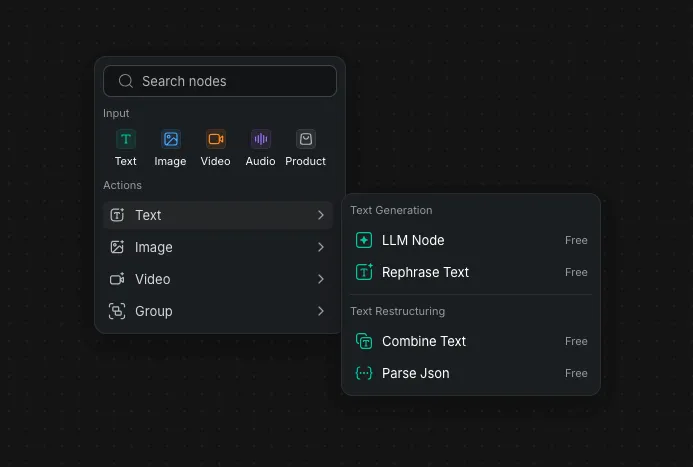
Or you can use the top menu bar's Plus button to access the same nodes menu:
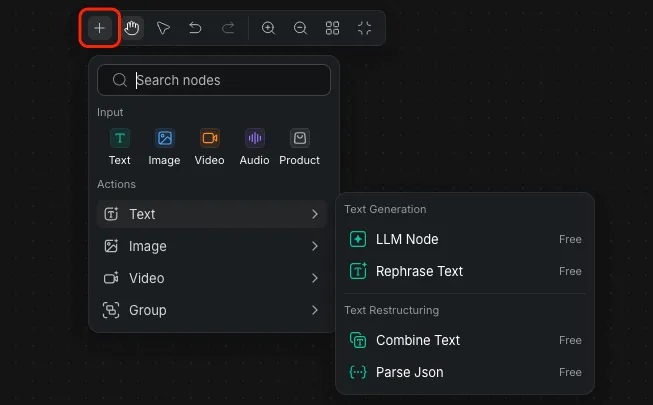
Nodes Input & Output
The true potential of the workflow is unlocked by how you connect your nodes. Nodes can receive input from other nodes, process the data, and generate new outputs — allowing you to build flexible and customizable creative workflows.
Data generally flows from left to right across your canvas:
- Inputs: Located on the left side of the Node Panel. These ports accept data (such as a text prompt or a reference image) from a previous node. Mandatory inputs are typically marked with an asterisk (*).
- Outputs: Located on the right side of the Node Panel. Once the node successfully runs and processes its task, the resulting asset (like a combined text string or a generated video) is passed downstream through these ports to the next step in your workflow.