
テキストノードを使用すると、ワークフローへのテキストの追加、AI モデルによるコンテンツの生成や書き換え、テキストの結合や分割、JSON データからの特定の値の抽出ができます。下流ノード用のプロンプトや構造化情報を準備するときに使用します。
1. テキストノード
テキスト ノードは、静的なコンテンツを入力するためのシンプルなテキストボックスです。手順、資料、システムプロンプト、ユーザープロンプト、またはワークフローの実行時に変更しないテキストに使用できます。
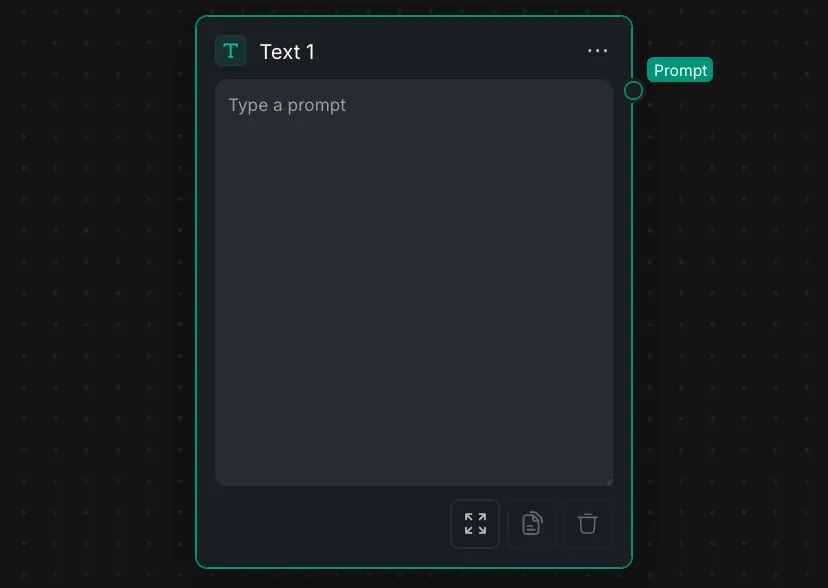
- 出力: テキストは プロンプト 出力ポートから下流に渡されます。
- ノードパネル: 下部のコントロールで、エディターの展開、テキストのコピー、内容の消去ができます。
2. テキスト生成
AI モデルで新しいテキストを生成したり、既存のテキストを変換したりする場合は、次のノードを使用します。
2.1 LLM ノード
LLM ノード は、大規模言語モデルを使用して、プロンプトと任意の参照画像から通常のテキストまたは構造化 JSON を生成します。
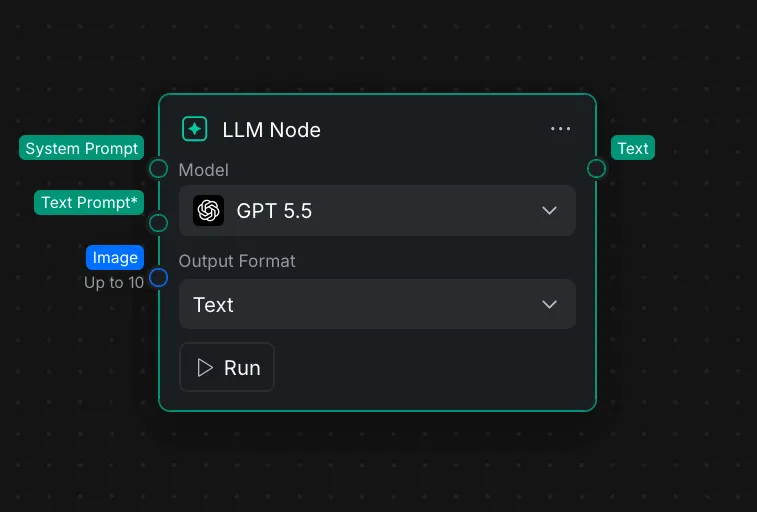
- システムプロンプト: モデルの役割、動作、トーン、出力ルールを定義する指示を必要に応じて接続します。
- **テキストプロンプト\*:** 主な依頼または元のテキストを接続します。この入力は必須です。
- 画像: 選択したモデルが画像入力に対応している場合、最大 10 枚の参照画像を接続できます。
- モデル: リクエストの処理に使用する AI モデルを選択します。
- 出力形式: 通常の文章には テキスト 、構造化データには JSON を選択します。
- 出力: 生成結果は テキスト 出力ポートから渡されます。
2.1.1 対応モデル
| プロバイダー | モデル |
|---|---|
| OpenAI | GPT 5.5, GPT 5.4, GPT 5.4 mini, GPT 5.4 nano, GPT 5.2, GPT 5.1, GPT 5 mini, GPT 5 nano |
| Anthropic | Opus 4.8, Opus 4.7, Opus 4.6, Sonnet 4.6, Haiku 4.5 |
| DeepSeek | DeepSeek V4 Pro, DeepSeek V4 Flash |
2.1.2 モデルの入力制限
| モデル | 出力形式 | プロンプトの最小長 | プロンプトの最大長 | 画像入力 |
|---|---|---|---|---|
| GPT 5.5 | テキスト、JSON | 1 文字 | 50,000 文字 | 最大 10 枚 |
| GPT 5.4 mini | テキスト、JSON | 1 文字 | 50,000 文字 | 最大 10 枚 |
| Opus 4.8 | 選択不可 | 1 文字 | 50,000 文字 | 最大 10 枚 |
| DeepSeek V4 Pro | テキスト、JSON | 3 文字 | 50,000 文字 | 非対応 |
2.2 テキストの言い換え
テキストの言い換え ノードは、AI モデルを使用して、接続されたテキストを特定の目的に合わせて書き換えます。
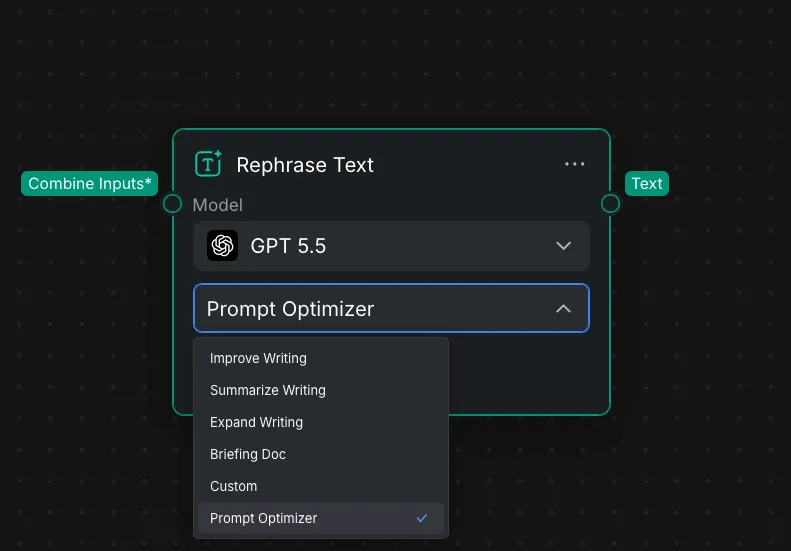
- **入力を結合\*:** 変換するテキストを接続します。この入力は必須です。
- モデル: テキストの処理に使用する AI モデルを選択します。
- 操作: 文章を改善 、文章を要約 、文章を拡張 、プロンプトオプティマイザー などの書き換えタスクを選択します。
- 出力: 書き換えた結果は テキスト 出力ポートから渡されます。
すでにあるコンテンツを改善または変換する場合は テキストの言い換え を使用します。システム指示、マルチモーダル入力、構造化 JSON 出力によって詳細に制御する必要がある場合は LLM ノード を使用します。
3. テキスト処理
テキストの結合、テキストの分割、JSON の解析ノードは、AI モデルを使用せずにテキストを再構成します。
3.1 テキストの分割
テキストの分割 ノードは、接続されたテキストを指定した区切り文字で分割し、選択した 1 つの部分を出力します。1 回の LLM 出力で複数のプロンプト案やシーンを生成し、それぞれを別の下流ノードへ渡すときに使用します。
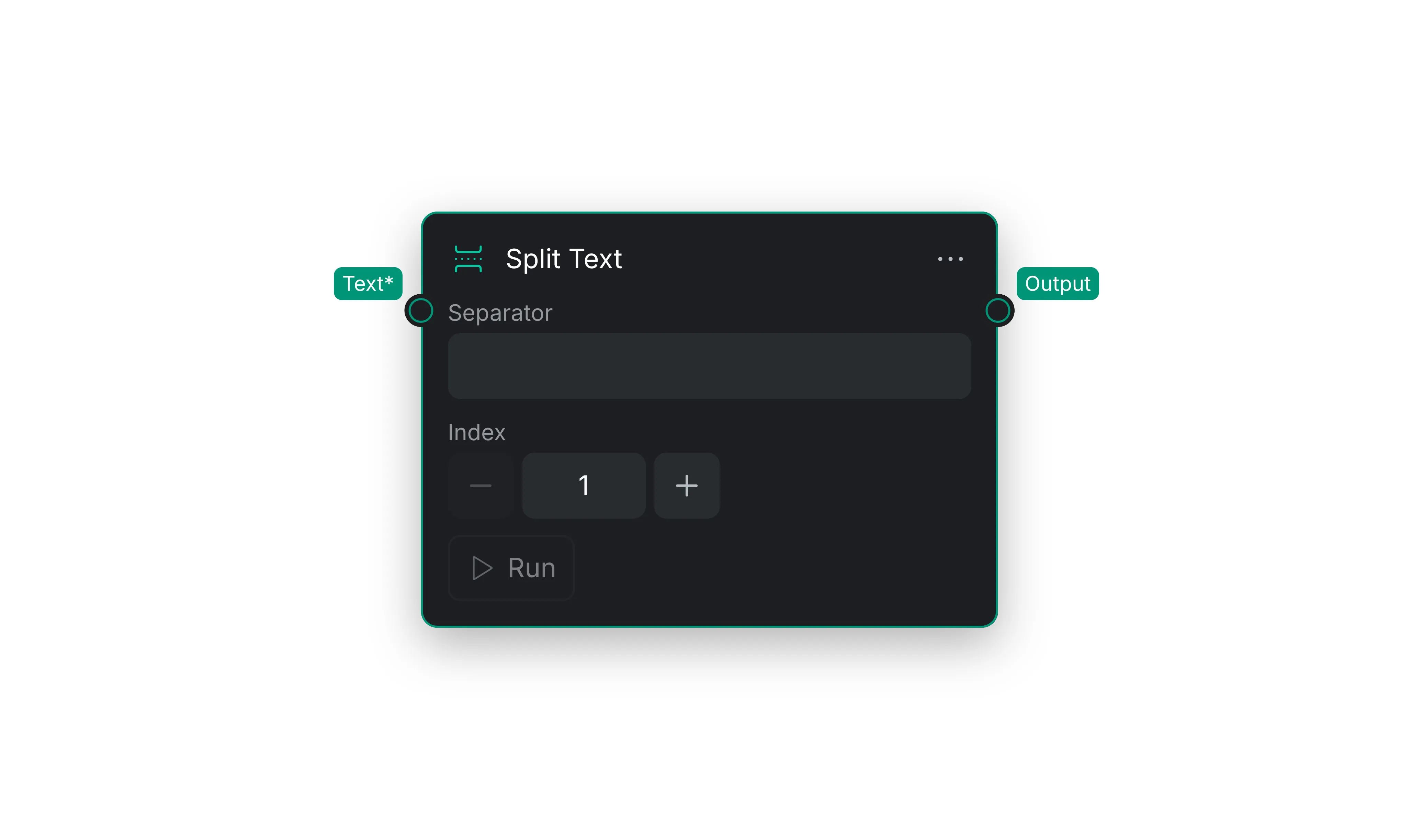
- プロンプト内で、分割する部分の間(異なる案やシーンの間など)に
<<PROMPT>>などの同じ区切り文字を入れます。 - 生成結果を テキスト\* 入力に接続します。
- 区切り文字 フィールドに、正確な区切り文字を入力します。
- 出力する部分の インデックス を設定します。
1は最初の部分、2は 2 番目の部分を返し、以降も同様です。 - ノードを実行すると、元のプロンプトから抽出された指定の部分が 出力 されます。
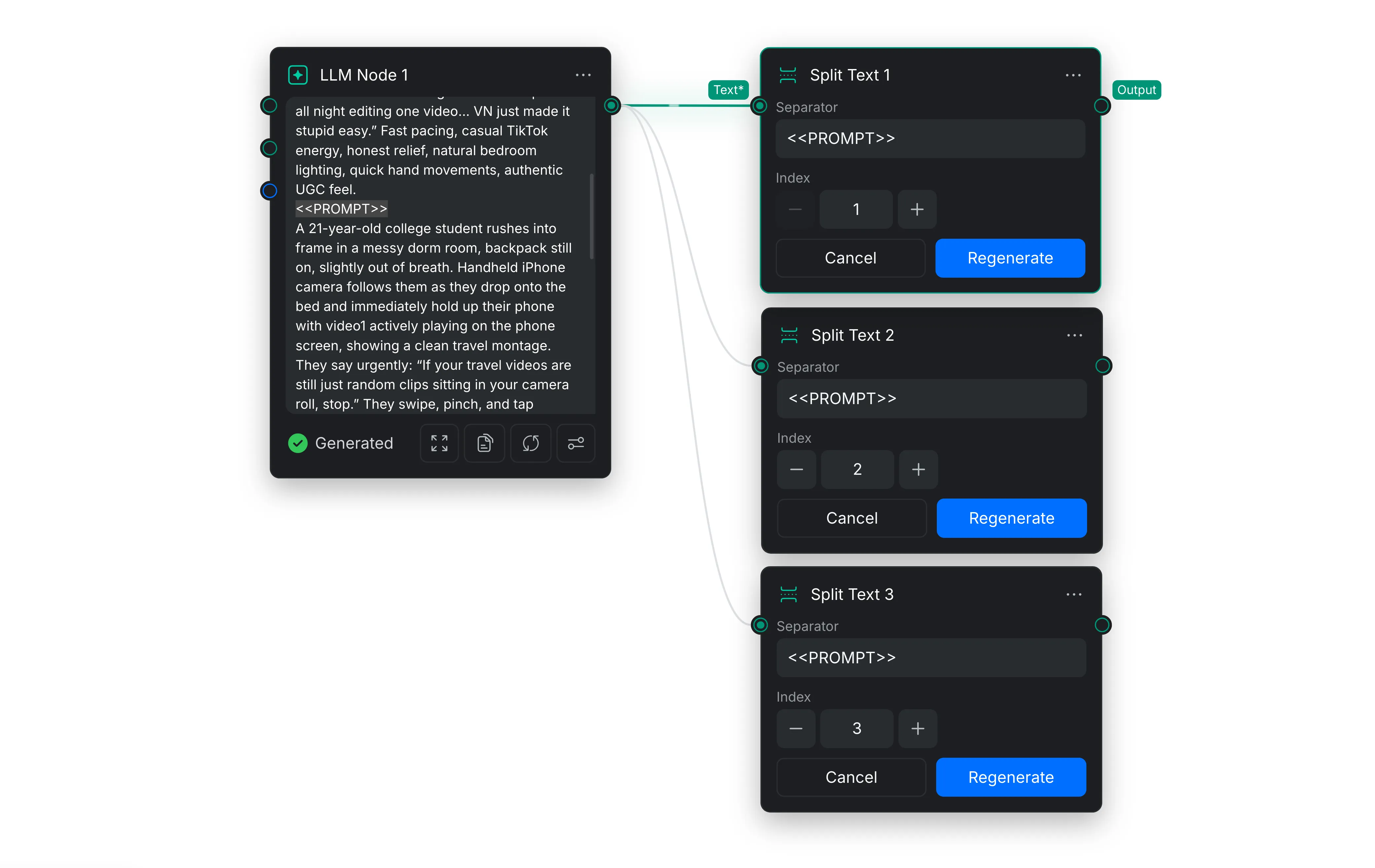
上の例は、テキストの分割ノードの使用方法を示しています。分割するプロンプトにテキストの分割ノードを接続し、各ノードに異なるインデックスを割り当てます。各テキストの分割ノードは、割り当てられたインデックスに対応するプロンプト部分のみを出力します。
3.2 テキストの結合
テキストの結合 ノードは、接続された複数のテキスト入力を 1 つの出力にまとめます。プロンプトの構成要素の組み立て、異なる分岐からの結果の結合、または 1 つのテキスト入力だけを受け付けるノードへの複数のテキスト値の受け渡しに便利です。
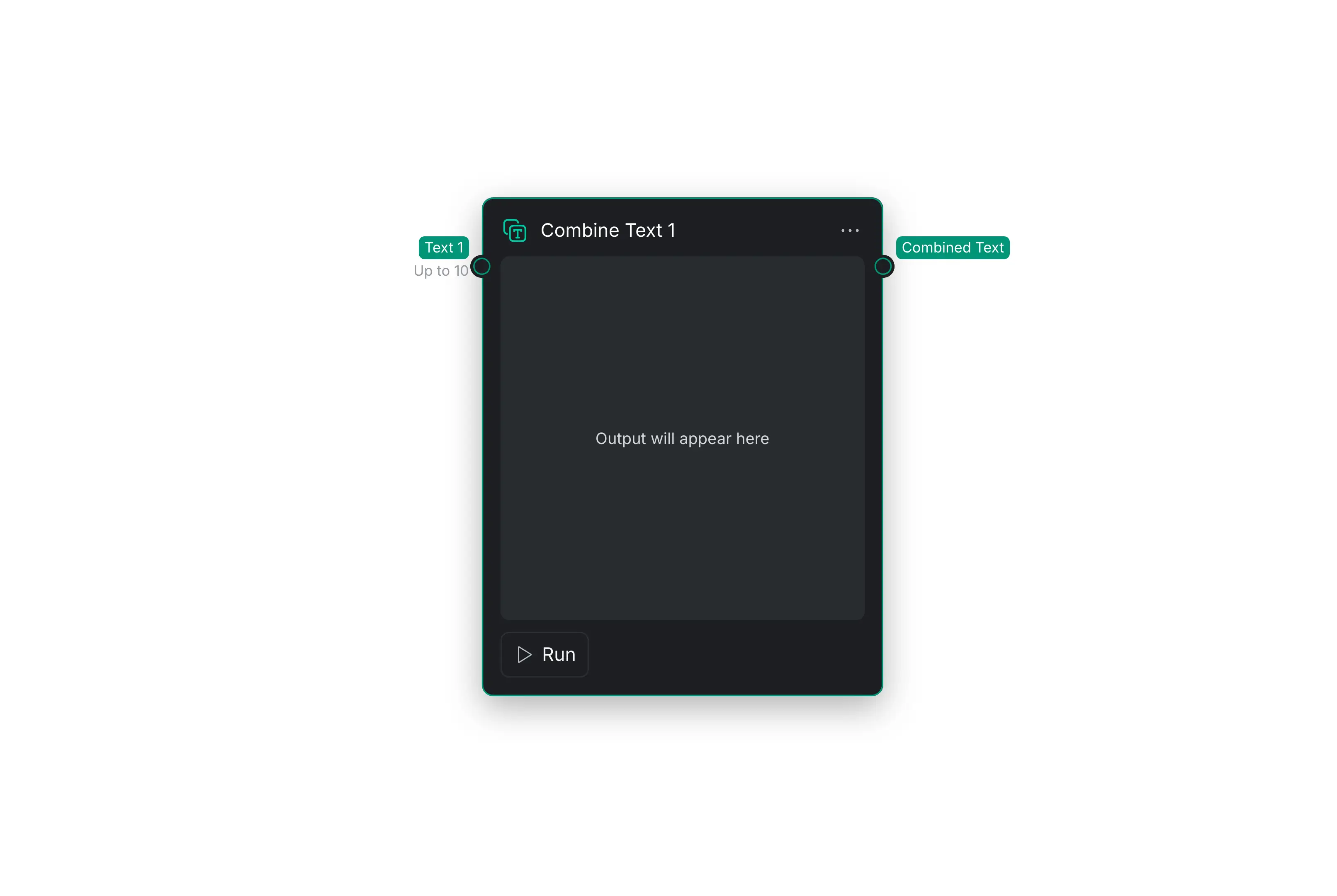
- 最大 10 個の値を テキスト 入力に接続します。
- ノードを実行して、接続されたテキストを結合します。
- 結合済みテキスト 出力をワークフロー内の次のノードに接続します。
このノードは入力テキストをそのまま結合し、書き換え、要約、解釈は行いません。
3.3 JSON の解析
JSON の解析 ノードは、構造化 JSON テキストから個別の値を抽出します。LLM ノードの JSON 結果や別の JSON 入力を、下流ノードが個別に使用できる出力へ分割するときに使用します。
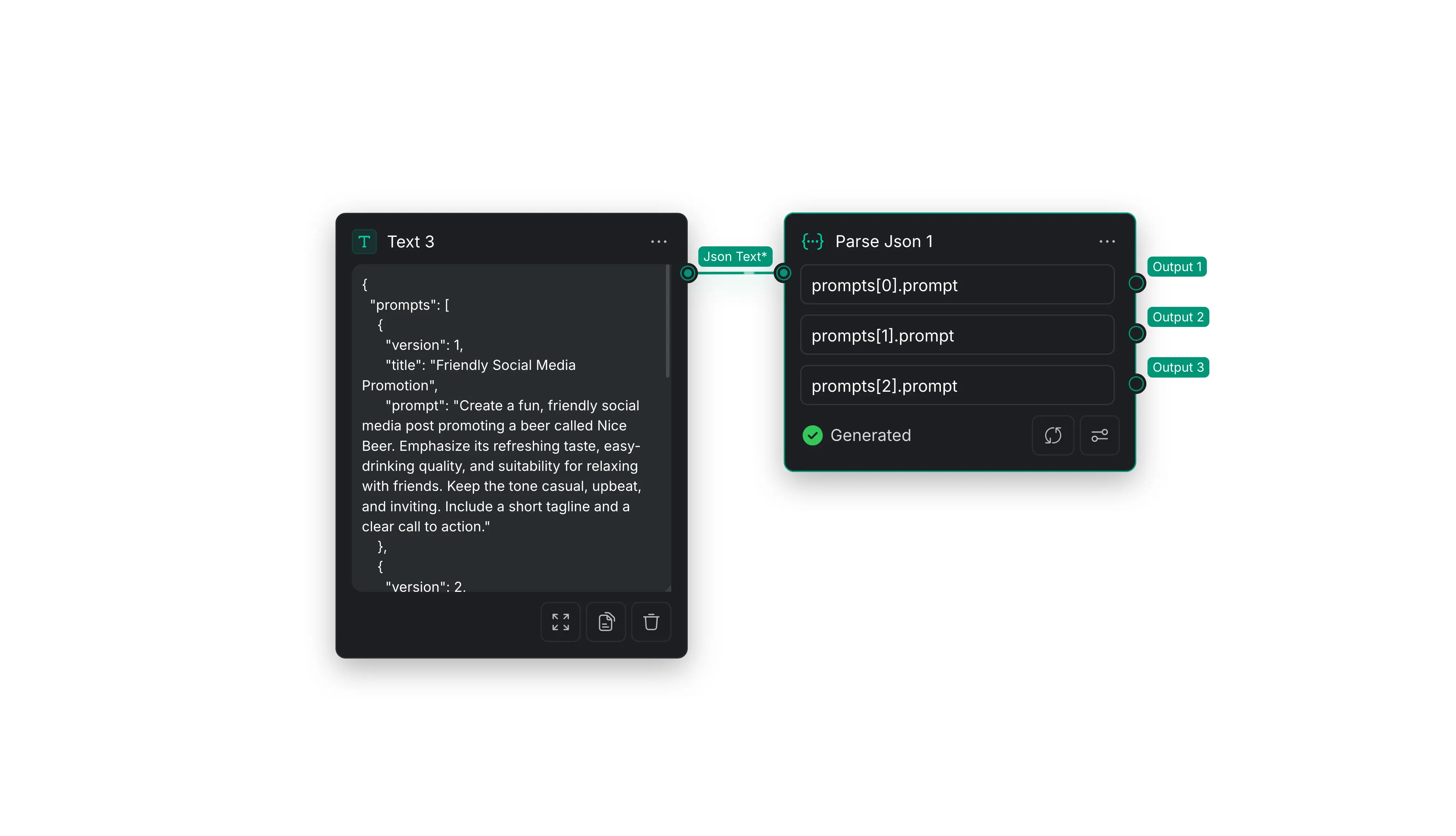
- 有効な JSON テキストを JSON テキスト\* 入力に接続します。
- 抽出する各値のパスを入力します。配列位置は
0から始まります。 - 必要に応じて出力フィールドを追加または削除し、ノードを実行します。
- 生成された各出力を適切な下流ノードに接続します。
たとえば、次の内容を テキスト ノードに貼り付け、JSON テキスト\* 入力に接続します。
{
  "prompts": [
    {
      "title": "製品紹介",
      "prompt": "製品を紹介する親しみやすいソーシャルメディア投稿を書いてください。"
    },
    {
      "title": "機能の紹介",
      "prompt": "製品で最も便利な機能を 1 つの段落で説明してください。"
    },
    {
      "title": "行動喚起",
      "prompt": "詳細を見るよう視聴者に促す短い行動喚起を書いてください。"
    }
  ]
}
JSON の解析 ノードに次のパスを入力します。
| フィールドパス | 抽出される値 |
|---|---|
prompts[0].prompt | 製品を紹介する親しみやすいソーシャルメディア投稿を書いてください。 |
prompts[1].prompt | 製品で最も便利な機能を 1 つの段落で説明してください。 |
prompts[2].prompt | 詳細を見るよう視聴者に促す短い行動喚起を書いてください。 |
別のプロパティを抽出するには、パスの最後のキーを変更します。たとえば、prompts[0].title は 製品紹介 を返します。
4. ノートノード
ノート ノードは、ワークフローキャンバスに説明文を直接追加します。他のユーザーにワークフローの仕組みを説明したり、ワークフローの特定部分にラベルや目印を付けて、キャンバスを理解しやすく整理しやすい状態にしたりするために使用します。
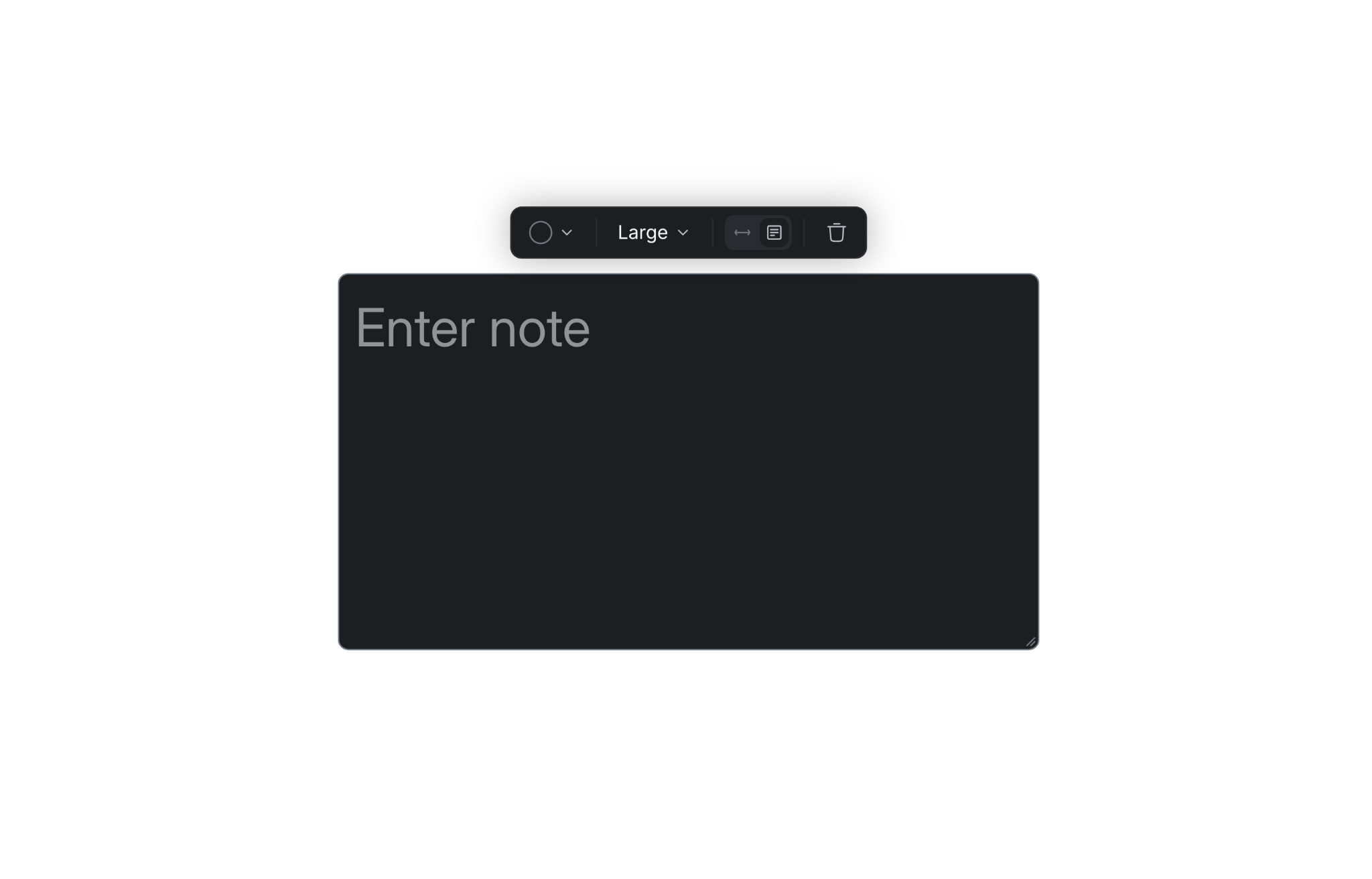
テキストボックス内をクリックしてノートを入力または編集し、設定を開きます。編集せずにノートを移動するには、テキストボックスの枠線をドラッグします。
- テキストの色: ノートを区別したり、ワークフローの関連部分を視覚的にグループ化したりする色を選択します。
- フォントサイズ: 小 、中 、大 、特大 から選択します。
- 自動幅: テキストボックスの枠線をテキストに近づけ、テキストの入力に合わせてボックスを自動的に広げます。
- 固定サイズ: 右下隅をドラッグしてテキストボックスのサイズを変更できます。自動幅 が有効な状態で右下隅をドラッグすると、ノートは自動的に 固定サイズ に切り替わります。
- 削除: ゴミ箱アイコンを選択してノートを削除します。