
CawCut skills connect compatible AI agents to CawCut, allowing you to run CawCut apps or generate images and videos directly from an agent conversation.
1. Before You Begin
You need:
- A CawCut account.
- A supported AI agent: Claude Code, OpenAI Codex, OpenClaw, Kimi Code, Qwen Code, or Cursor.
- Access to a terminal where you can run the installation and authentication commands.
CawCut currently provides two skills:
| Skill | What it does |
|---|---|
cawcut-app-run | Lists and runs official or user-created CawCut apps available to your account. |
cawcut-generate | Generates images or videos from a flexible prompt and optional references. |
1.1 Open the CawCut Skills Page
- Go to the CawCut Skills page.
- Sign in to your CawCut account when prompted.
The page is available only after you sign in.
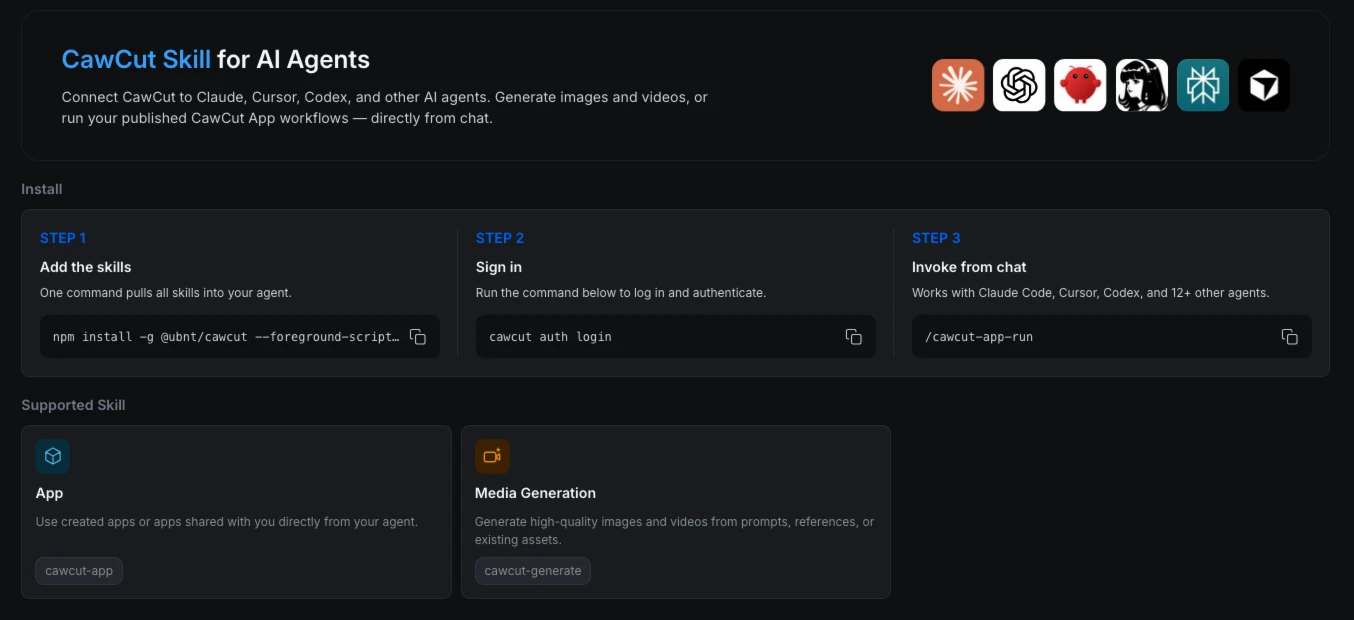
1.2 Add the Skills
The CawCut Skills page shows the installation and authentication steps in one place.
- Under [Step 1: Add the skills], select the copy button beside the installation command.
- Paste the command into your terminal. It should look like this:
npm install -g @ubnt/cawcut --foreground-scripts --allow-scripts=@ubnt/cawcut- Run the command and wait for the installation to finish. Grant any requested permissions.
1.3 Authenticate Your Account
Run the authentication command shown on the CawCut Skills page. The current command is:
cawcut auth loginComplete the sign-in process in your browser. The AI agent must be authenticated before it can access your apps or submit generation tasks.
2. Start Using CawCut Skills
After installation and authentication, choose the skill that matches your task:
To generate an image or video you can use:
/cawcut-generate- Read Generate Images and Videos With cawcut-generate Skill to create images or videos from flexible prompts and references.
To browse and run a CawCut app you can run:
/cawcut-app-run- Read Run CawCut Apps With cawcut-app-run Skill to browse and run predefined CawCut apps.
You can include your request in the same message or let the skill ask for the information it needs.